
Enhanced Spell Check
Intro
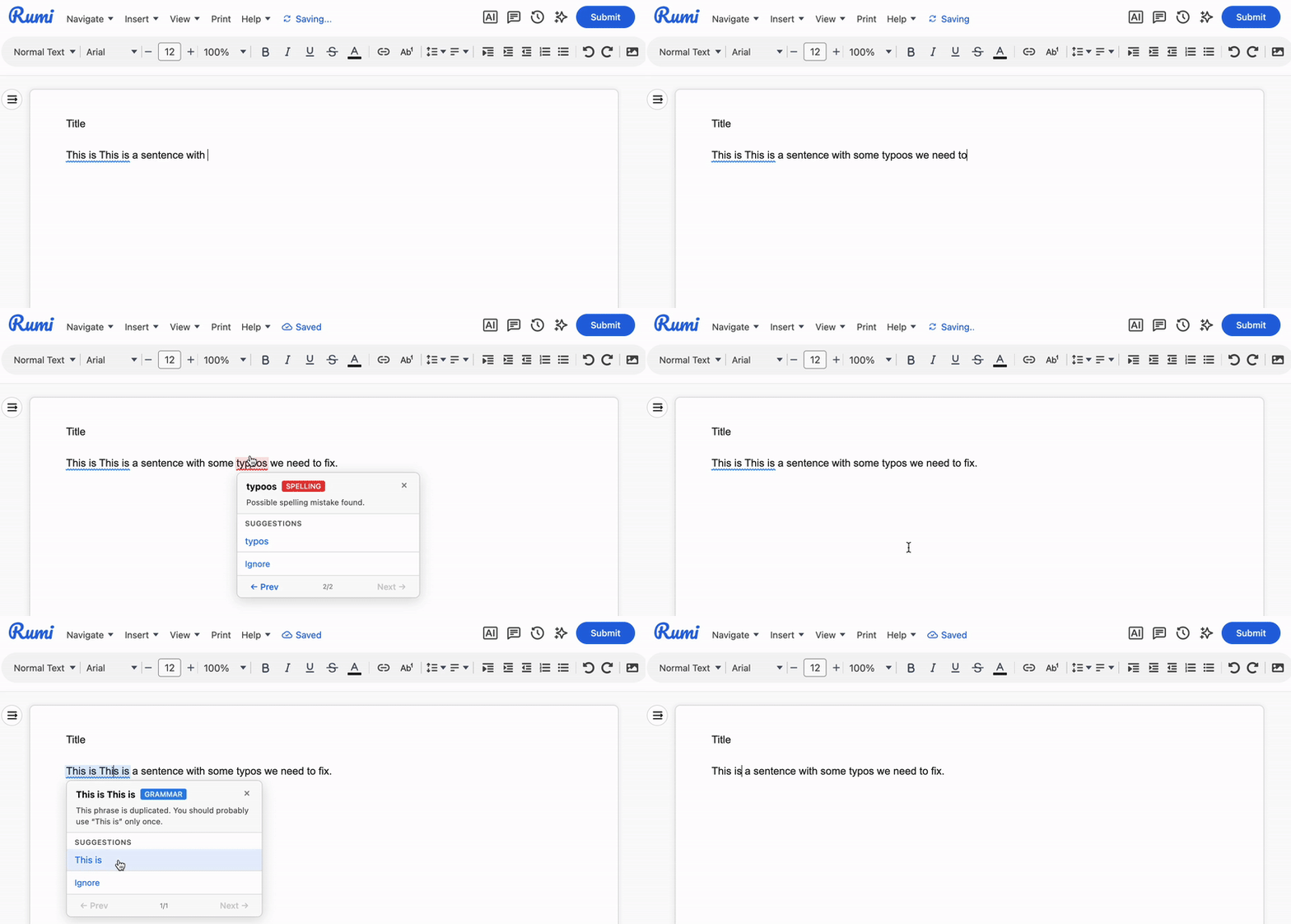
Rumi’s built-in spell checker identifies spelling and grammar errors as students write, allowing them to correct mistakes instantly without ever leaving the editor. This feature is only available for enterprise users.
Note: Enhanced Spell Check is a writing support tool—it identifies errors and suggests corrections, but does not rewrite or paraphrase text. For AI-powered editing features like paraphrasing or translation, see Translation Guide.
What Enhanced Spell Check Does
- Catches spelling errors — Misspelled words are underlined as you type, with suggested corrections available on click.
- Identifies grammar issues — Common grammar mistakes such as incorrect capitalization, incorrect verb forms, and punctuation errors are flagged.
- Automatically detects language — No need to manually select a language. Enhanced Spell Check identifies the language being used and applies the appropriate spelling and grammar rules automatically.
- Supports 30+ languages — Works with English (US, UK, Australian, Canadian), Spanish, French, German, Portuguese, Dutch, Polish, Arabic, and many more.
- Works in any document — Available across all assignments, independent of AI Policy settings.
How It Works
As students type, Enhanced Spell Check runs automatically in the background. Errors appear underlined in the editor. To correct an error:
- Click on the underlined word or phrase.
- Review the suggested corrections.
- Click a suggestion to apply it, or dismiss if no change is needed.
- You may also add misspelled word to your personal dictionary.
Students remain in control—corrections are never applied automatically.
What Enhanced Spell Check Does NOT Do
Enhanced Spell Check is designed to catch errors, not rewrite content. It will not:
- Paraphrase or reword sentences — Use AI Prompts for rephrasing tasks. See Guided AI Guide for paraphrasing tools you can enable for students.
- Translate text — See the Rumi Translation Guide for translation features.
- Generate new content — Spell check only reviews existing text.
This distinction ensures that spell check supports student writing without doing the writing for them.
Supported Languages
Enhanced Spell Check automatically identifies the language being used and applies the appropriate spelling and grammar rules automatically.
Enhanced Spell Check supports the following languages:
- English — US, UK, Australian, Canadian, New Zealand, South African
- Spanish — Including Latin American variants
- German — Germany, Austria, Switzerland
- French — France, Belgium, Canada, Switzerland
- Portuguese — Brazil, Portugal
- Dutch — Netherlands, Belgium
- And 20+ more — Including Polish, Russian, Italian, Greek, Ukrainian, Arabic, Catalan, Romanian, and others
How to Disable
This feature is turned ON by default for all assignments. You can disable this feature per assignment in Assignment Settings → Additional Settings → Disable Enhanced Spell Check.

Privacy & Data Handling
Enhanced Spell Check runs on Rumi's own infrastructure. Student text is processed securely and is not sent to third-party services. This makes it suitable for assignments involving sensitive content or where data privacy is a concern.
Common Questions
- Is spell check always on? Yes, Enhanced Spell Check runs automatically for all documents. Students can ignore suggestions if they prefer.
- Does spell check work with RTL languages like Arabic? Yes. The editor supports right-to-left scripts, and spell check functions normally for supported RTL languages.
- Can instructors disable spell check? Enhanced Spell Check is currently enabled by default for all documents and cannot be disabled per assignment.
- Why didn't spell check catch a specific error? Enhanced Spell Check uses rule-based detection. It catches common errors effectively but may miss unusual phrasing or highly context-dependent mistakes. For deeper feedback, consider using AI Prompts.